

Have you ever typed a detailed request into ChatGPT, hit enter with high expectations, and then thought, “Why is this so bad?”
If you’re a beginner marketer or content creator, you’ve likely felt that sting.
But here is the cold, hard truth: Most of the time, it’s not the AI, it’s the prompt. When your prompt is vague, the output is vague. When your prompt is sloppy, the results are generic and unusable.
Enter Pretty Prompt, the game-changing tool that turns “meh” instructions into high-performance AI prompts in seconds.
In this guide, we’re going to show you exactly how to stop the “guesswork” and start getting professional-grade content from tools like ChatGPT, Claude, and Gemini.
🔥 HOT DEAL ALERT: You can currently grab lifetime access to Pretty Prompt on AppSumo for just $34! That is a one-time payment for a tool that will save you hours of frustration every single week.
Get the Pretty Prompt Lifetime Deal on AppSumo Now
Table of Contents
What is Pretty Prompt? (And Why You Need It)
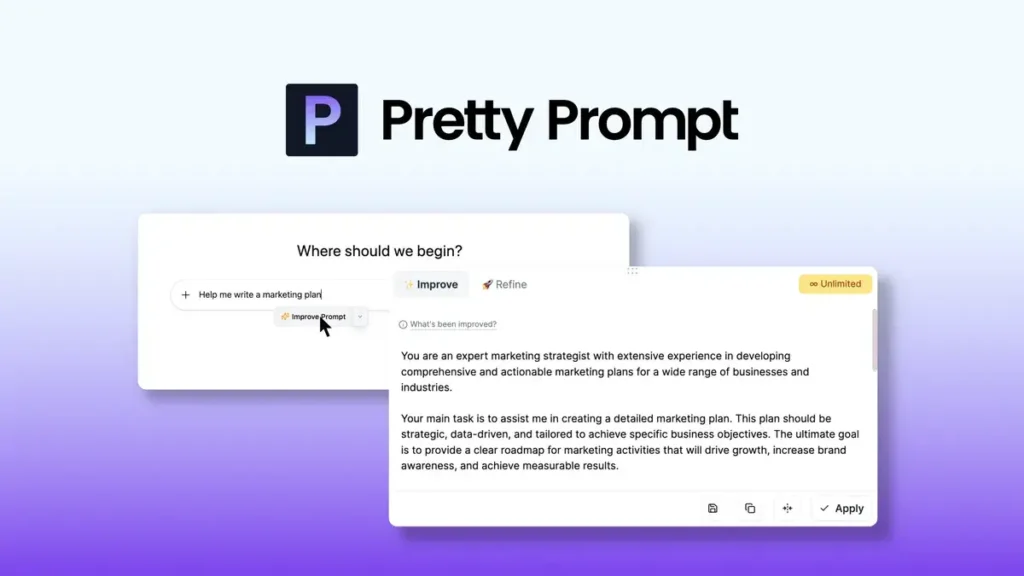
Pretty Prompt is a prompt optimization tool designed to bridge the gap between what you want and what the AI understands. It helps you clean up your language, add structure, and fill in the missing gaps that usually lead to poor AI performance.
For beginner marketers, the learning curve for “Prompt Engineering” can be steep. Pretty Prompt eliminates that curve. Instead of you constantly wondering, “What am I missing in this prompt?”, the tool does the heavy lifting for you.
Key Benefits for Content Creators:
- Better Output: No more generic “robotic” writing.
- Fewer Retries: Get it right the first time instead of clicking “Regenerate” five times.
- Less Time Wasted: Stop manual prompt tweaking and focus on your strategy.
How Pretty Prompt Works: A Step-by-Step Tutorial
Pretty Prompt offers two primary ways to fix your prompts: Improve and Refine. Understanding the difference between these two is the key to mastering your AI workflow.
1. The “Improve Prompt” Feature (Quick Fixes)
The Improve Prompt feature is perfect for when you’re in a hurry or trying to learn a new topic. You simply enter a basic instruction, and Pretty Prompt automatically adds:
- A Persona: It might turn your prompt into the voice of a “highly experienced content strategist.”
- An Objective: It defines a clear goal for the AI.
- Tone and Style: It adds adjectives like “compelling” and “insightful” to guide the writing.
The Transformation: From Vague Instructions to Professional Output
To see the real power of Pretty Prompt, you have to see the Before vs. After. Most beginner creators treat AI like a search engine, but Pretty Prompt treats it like a professional employee.
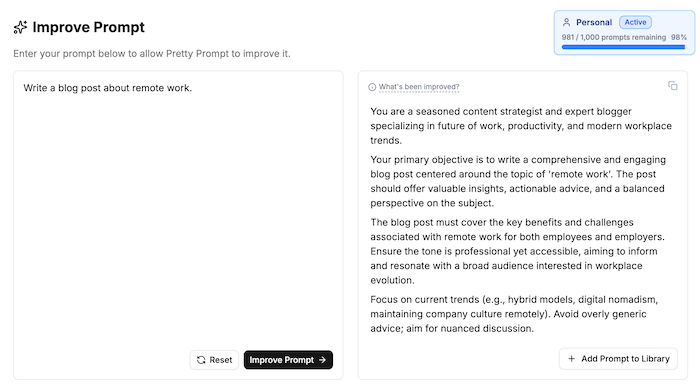
Look at how the “Improve Prompt” feature handles a basic request in the screenshot below:
What’s happening here?
As you can see, the original prompt—“Write a blog post about remote work”—was just a skeleton. It lacked context, tone, and specific goals. By running it through Pretty Prompt, the tool automatically injected:
- A “Seasoned” Persona: Instead of generic AI, it assigned the role of a “seasoned content strategist and expert blogger” specializing in productivity and workplace trends.
- Clear Primary Objectives: It defined exactly what the post should achieve: offering valuable insights, actionable advice, and a balanced perspective.
- Targeted Content Focus: It didn’t just stay broad; it commanded the AI to cover specific current trends like hybrid models, digital nomadism, and company culture.
- Tone & Quality Control: It explicitly instructed the AI to avoid “overly generic advice” and aim for “nuanced discussion,” ensuring the final result is 99signals-quality.
The Bottom Line: Using the “Improved” version doesn’t just give you more words—it gives you an output that requires 80% less editing because the instructions are surgically precise.
🚀 Ready to stop settled for generic AI fluff? Claim your Pretty Prompt Lifetime Deal on AppSumo for just $34
2. The “Refine Prompt” Feature (Professional Results)
This is where the real magic happens. If you are writing a professional blog post or creating marketing copy, the Refine Prompt tool is your best friend.
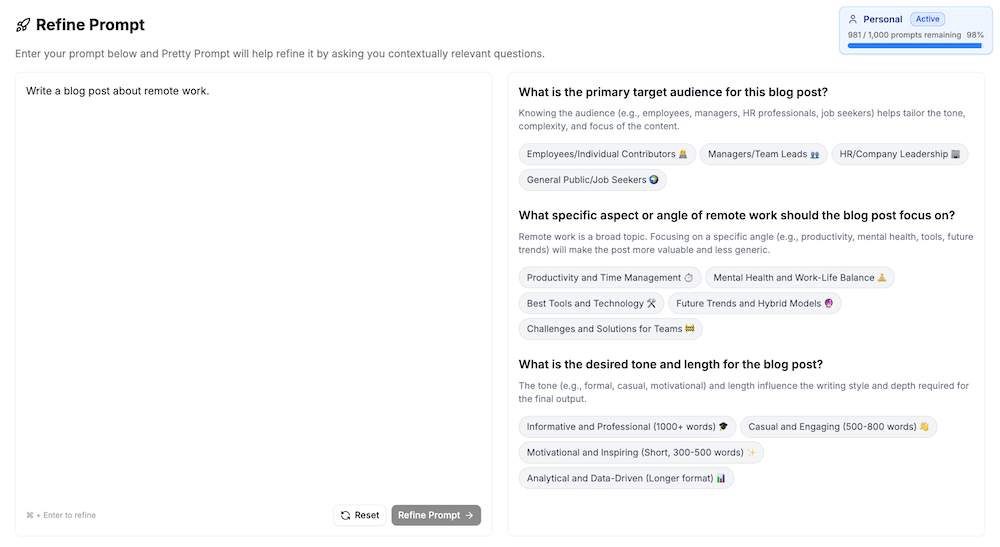
Instead of guessing, Pretty Prompt asks you a series of targeted questions:
- Who is the target audience? (e.g., HR managers, freelancers, CEOs)
- What is the specific tone? (e.g., Professional, witty, authoritative)
- What is the desired length? (e.g., A quick summary or an in-depth 2,000+ word guide)
By answering these quick questions, you take the guesswork out of the equation. The resulting prompt is incredibly fleshed out, meaning the AI has a 95% higher chance of giving you exactly what you need.
Step 1: Building the Strategic Foundation
As you can see in the screenshot above, Pretty Prompt doesn’t just ask for a topic; it demands context. Here is why this step is so vital for your results:
- Audience Precision: By selecting options like Managers/Team Leads or HR/Company Leadership, you ensure the AI speaks to the specific pain points and responsibilities of that group.
- The “Angle” Strategy: You aren’t just writing a broad post; you are choosing a lens—like Productivity, Mental Health, or Future Trends—which prevents the AI from generating generic “fluff”.
- Automatic Formatting: By choosing the Tone and Length (e.g., Informative and Professional, 1000+ words), the tool pre-configures the structural complexity the AI needs to hit those markers on the first try.
Step 2: The Logic of the Refined Output
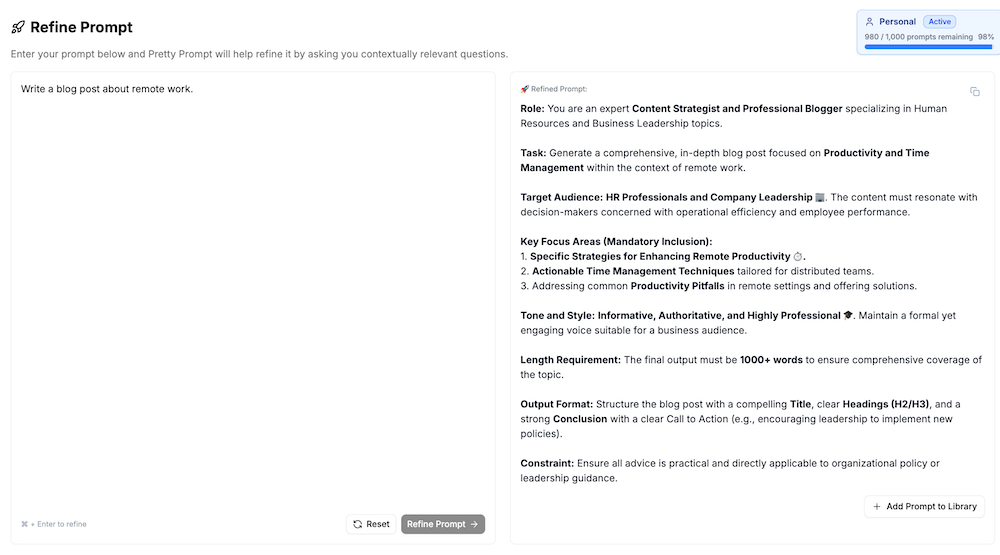
Now, look at the output generated in the above screenshot. Pretty Prompt has translated the simple answers into a professional-grade instructional framework:
- Role Identity: It transforms the AI from a generic bot into an “expert Content Strategist” specialized in HR and Business Leadership topics.
- Mandatory Focus Areas: It hard-codes a checklist of requirements, such as Actionable Time Management Techniques and Productivity Pitfalls, ensuring the AI doesn’t miss the details that add real value to your readers.
- Structural Constraints: It mandates a specific Output Format, including clear H2/H3 headings, a strong Conclusion, and a clear Call to Action—giving you a 99signals-style post structure immediately.
- Professional Guardrails: By adding Constraints (ensuring all advice is “practical and directly applicable”), it forces the AI to stay grounded in reality rather than theoretical jargon.
The result? A prompt that produces content you can actually use, saving you hours of manual prompt-tweaking.
🔥 Stop fighting your AI and start getting results. Get the Pretty Prompt Lifetime Deal on AppSumo for $34
Using the Pretty Prompt Chrome Extension
One of the best features of Pretty Prompt is that you don’t even have to leave your favorite AI chatbot.
When you install the Pretty Prompt Chrome Extension, a small icon appears directly inside the ChatGPT or Google Gemini interface. You can type your messy prompt right into the chat box, click the Pretty Prompt icon, and optimize it on the fly.
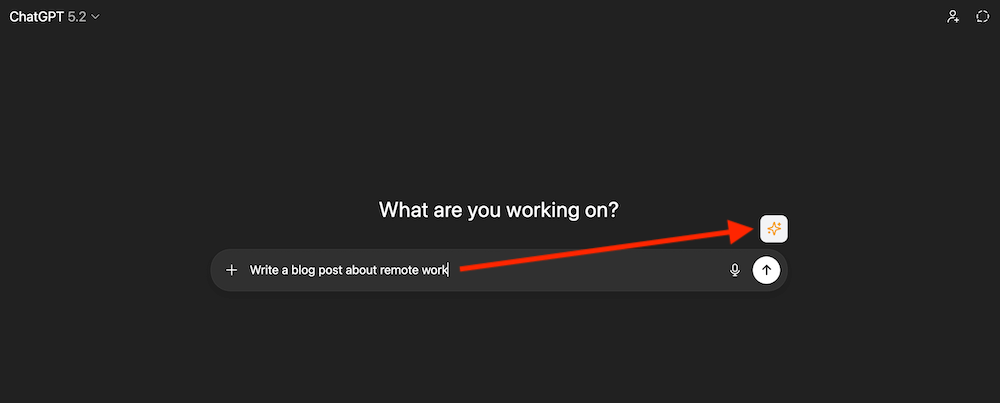
This seamless integration ensures that you are always using the best possible instructions without the friction of switching tabs.
Why the AppSumo Lifetime Deal is a No-Brainer
If you’ve looked at other prompt engineering tools, they often come with a hefty monthly subscription. Through AppSumo, you can get a Lifetime Deal, meaning you pay once and own it forever.
The Licensing Tiers:
- License Tier 1 ($34): Perfect for individual creators.
- License Tier 2 ($99): Ideal for “power users” who need to optimize thousands of prompts per month.
- Higher Tiers: Great for agencies who need to add multiple team members to the account.
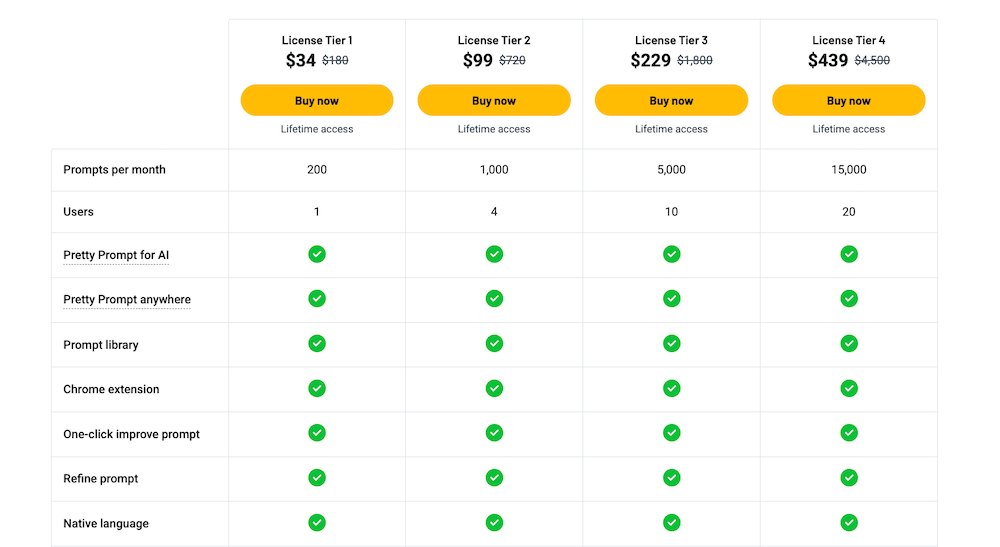
Regardless of which plan you choose, you get access to all features, including the Chrome extension and both optimization modes. If you’re an agency owner or working with a team, License Tier 2 and above are highly recommended so you can share the power of Pretty Prompt with your colleagues.
The Verdict: Is Pretty Prompt Worth It?
If you are a beginner marketer, time is your most valuable asset. Spending thirty minutes trying to get ChatGPT to stop sounding like a robot is thirty minutes you could have spent on sales or strategy.
Pretty Prompt removes the “laziness” and “sloppiness” from your AI interactions. While you still need to do original research and fact-check (AI can still hallucinate!), this tool ensures the foundation of your content is rock solid.
Final Pros:
- Extremely easy to use (No technical skills required).
- Chrome extension works within ChatGPT and Gemini.
- The “Refine” feature is a masterclass in prompt engineering.
- Unbeatable price point on AppSumo.
Final Cons:
- You still need to edit the final output (but that’s true for all AI!).
Final Thoughts: Take Action Before the Deal Ends!
Stop settling for mediocre AI content. Whether you’re writing blog posts, social media captions, or email sequences, Pretty Prompt is the secret weapon you need in your marketing toolkit.
At the time of writing, there are only a few days left on the AppSumo lifetime deal. For a small one-time investment of $34, you can permanently upgrade the quality of everything you produce with AI.
🎉 Don’t miss out! Click here to grab the Pretty Prompt Lifetime Deal on AppSumo for $34
Want to see it in action? Watch our full video review and demo below or on the 99signals YouTube channel.
Pretty Prompt FAQ
Is Pretty Prompt a one-time purchase?
- Yes, if you grab the lifetime deal on AppSumo, you pay once and get permanent access to the “Pro” features. This is a significant saving compared to other AI prompt libraries that charge a monthly subscription.
Does Pretty Prompt work with ChatGPT Plus, Claude, and Gemini?
- Absolutely. Because it is a Chrome extension, Pretty Prompt overlays directly onto the interfaces of all major LLMs. You can refine your prompts in ChatGPT and then use the same improved prompt in Claude 3.5 or Gemini with one click.
How does the ‘Refine Prompt’ feature differ from ‘Improve Prompt’?
- While “Improve” adds detail to your initial idea, the “Refine” tool focuses on structure. It helps you set roles, constraints, and output formats (like tables or bullet points), which is essential for getting consistent results from AI.
Is there a free version of Pretty Prompt?
- There is a basic version, but it lacks the advanced refinement tools and the full prompt library. For power users and freelancers, the AppSumo lifetime deal is the most cost-effective way to unlock the full potential of the tool.